
Advanced SQL Editor
Context-aware auto-completion (IntelliSense), schema introspection, syntax folding, dynamic parameters (:param), and multiple script execution modes (Ctrl+Enter, Alt+X).
Accelerate your SQL and procedural development. Learn how to write robust scripts, debug complex stored procedures, reverse-engineer database architectures, and tune execution plans like a seasoned database engineer.
-- DBeaver Script Execution Mode: Alt + X
-- Setting custom statement delimiter for batch processing
--delimiter //

CREATE TABLE employees_log (
    log_id BIGSERIAL PRIMARY KEY,
    emp_id INT NOT NULL,
    action_type VARCHAR(50),
    created_at TIMESTAMP DEFAULT CURRENT_TIMESTAMP
)//

-- Parameter binding in DBeaver (:param triggers prompt dialog)
SELECT emp.id, emp.full_name, emp.salary, dept.department_name
FROM employees emp
INNER JOIN departments dept ON emp.dept_id = dept.id
WHERE dept.department_name = :target_dept
AND emp.salary >= 75000//Unlike basic SQL viewers, DBeaver provides a comprehensive IDE environment built on the Eclipse framework with enterprise-grade capabilities for writing, analyzing, and maintaining database software.
Context-aware auto-completion (IntelliSense), schema introspection, syntax folding, dynamic parameters (:param), and multiple script execution modes (Ctrl+Enter, Alt+X).
Interactive step-by-step debugging for PostgreSQL (via pldbgapi), Oracle PL/SQL, and IBM DB2. Place breakpoints, inspect call stacks, and watch variable states in real time.
Transform raw database query plans into interactive visual trees. Instantly pinpoint table scans, costly nested loops, disk spills, and index bottlenecks.
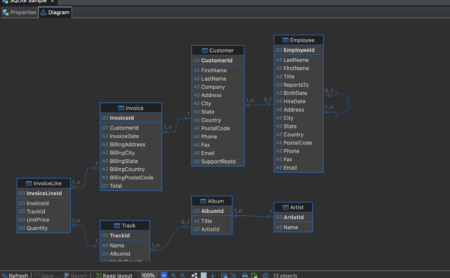
Automatic reverse engineering of complex schemas. Create virtual relationships without changing the schema, generate DDL scripts, and export diagrams to SVG or PNG.
Distinguish Production, Test, and Dev environments with color-coded banners. Block unintended bulk UPDATE/DELETE operations without WHERE clauses automatically.
Comprehensive reference of over 60 developer shortcuts for navigation, formatting, data manipulation, and command line batch execution.
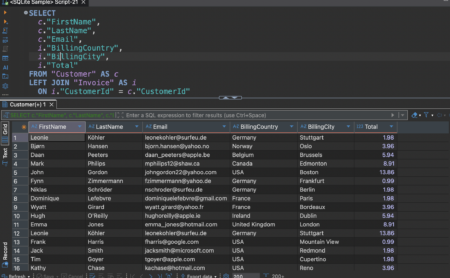
DBeaver's SQL editor is designed for real-world software engineering workflows. Write multi-dialect migration scripts with seamless delimiter handling and parameterized data models.
Understand and refactor legacy relational structures with DBeaver's integrated Entity-Relationship Diagram (ERD) engine.
Structured learning tracks from foundational queries to high-throughput database optimization.
Master connection management, SSH tunneling, driver configuration, smart code completion, and query result formatting in grid and text modes.
Write, compile, and debug procedural code. Master delimiters, exception handling, cursor loops, and step-by-step debugging with live variable watches.
Architect scalable database schemas visually. Generate differential DDLs, build cross-database data transfer pipelines, and manage mock data.
Diagnose latency bottlenecks using DBeaver Visual Explain. Learn indexing strategies, buffer cache impact, and join algorithm refactoring.
Answers to essential technical questions regarding features, dialect support, and best practices.
Yes. You can write, compile, and execute stored procedures, functions, and triggers for all major databases (PostgreSQL, MySQL, Oracle, SQL Server, SQLite) in DBeaver Community Edition. For step-by-step interactive debugging with breakpoints and variable watching, PostgreSQL debugging is supported via the official pldbgapi extension, while commercial engines (Oracle, DB2) offer native debugging integration in DBeaver PRO.
Ctrl + Enter executes only the current individual SQL query under your cursor, regardless of where your cursor is positioned within the statement. In contrast, Alt + X executes the entire open SQL editor tab as a sequential batch script, executing each statement separated by delimiters.
DBeaver supports two types of variable substitution:
1. Interactive Parameters: Prefix an identifier with a colon (e.g. :user_id). When you execute the query, DBeaver opens a popup dialog to supply the value.
2. Client-side Variables: Declare a variable with @set my_var = 'value' and reference it in your SQL using ${my_var}. DBeaver will interpolate the value before dispatching the query to the database server.
By default, DBeaver uses the semicolon (;) as the statement delimiter. When defining triggers or stored procedures containing multiple statements, you can instruct DBeaver to use custom delimiters with the directive --delimiter $$ or DELIMITER // at the top of the block.
No. DBeaver Developer Academy is an independent community-driven educational documentation portal. DBeaverâ„¢ is a trademark of DBeaver Corp. All tutorials, cheat sheets, and technical guides here are published under fair educational use to support developers worldwide.